
 Posts
Posts


Quiet on the blog front lately as my wife and I are moving and most free time is taken up with packing. I did manage to finish the BuOrd Pamphlet for the Mk8 Fire Control Radar and post for those interested in US Navy battleship & cruiser fire control.
I started a new interview; two scouting squadron commanders in April of 1943. One of the humorous aspects of my work is the occasional OCR glitch that happens to make a sentence a lot stranger or funnier than the author intended. For example, "planes" will come through as "pianos" due to the similar shapes in the second and fifth character. So you read sentences that refer to high-altitude bombing by carrier-based pianos, or two pianos dropping depth charges on a u-boat... gives me a little chuckle from time to time.
Also managed to arrange for a trip down to San Francisco next month for a week of research thanks to the kindness of a friend. Minor joy.....probably the only trip this year.
Thursday, June 24, 2010


Monday, May 31, 2010
Memorial Day, 2010
A large part of why I do the site is Veterans; I've come across so many documents that bring up actions and sacrifice unknown to me and perhaps the population at large that it seems a shame to not share them. To the ones who gave their lives defending the United States of America; we are eternally humbled by your actions, great or small. To those that survived, wounded in flesh or spirit, I offer thanks and the hopes that you feel gratitude from others not just on this day, but every day.
Thursday, May 27, 2010
What a Battleship can do for your web traffic
I use Google Analytics to watch what the site is doing traffic wise. I usually pull in between 75-100 visitors a day, not enough that the site makes any money, but enough that I know that people are finding interesting things to read.
Occasionally there's a spike of 40-50 hits that I can trace down to a forum stumbling across an article and discussing it, but last week I had the biggest spike I've yet seen:

Two days prior I had posted this memo regarding BB-59 Massachusetts' experience in a storm that suggested her to be not suited to rough weather, at least not early in her career. I usually toss a quick notice on Twitter and save the rest for notices on my monthly updates, but I decided for fun to post it on ModelWarships' and SteelNavy's forums to maybe start some discussions. Two days later is the spike, which coincides with when a thread started on the NavWeaps board.
Nothing ground shaking, just interesting. Truly if you want a spike in traffic you need to get noticed on a social media site or message board.
Occasionally there's a spike of 40-50 hits that I can trace down to a forum stumbling across an article and discussing it, but last week I had the biggest spike I've yet seen:

Two days prior I had posted this memo regarding BB-59 Massachusetts' experience in a storm that suggested her to be not suited to rough weather, at least not early in her career. I usually toss a quick notice on Twitter and save the rest for notices on my monthly updates, but I decided for fun to post it on ModelWarships' and SteelNavy's forums to maybe start some discussions. Two days later is the spike, which coincides with when a thread started on the NavWeaps board.
Nothing ground shaking, just interesting. Truly if you want a spike in traffic you need to get noticed on a social media site or message board.
Technique - Photoshop Levels
One of the techniques I use heavily is the photoshop "levels" command. Even if a document that is scanned in is on white paper, there will be background noise that shows up. Levels allows one to take much of that out. This came up when I was talking with a friend and commented that I wished the Historic Naval Ship Association would do it on some of their documents. While it can add a few seconds to each document, I do believe the results are worth it, if you're aiming for a document that prints well or is to be reproduced in a book or magazine.
The below images show the technique I came up with farting around on my own; I don't profess to be a master, and I'm using a ten year-old version of Adobe Photoshop, so your screen may look a little different if you're trying this for the first time on a newer version, but the principles are the same.
In photoshop, go to "image" --> "Adjust" and choose "levels." You'll wind up with something that looks like the below image:
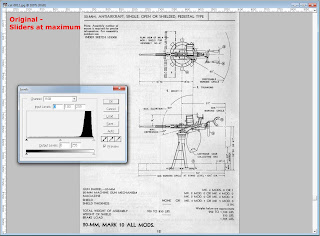
Now, take the black point slider on the left and move it towards the center, to make the darks darker, and then the white point slider on the right and move it to the center, to make the whites whiter. You are essentially adjusting the contrast of the image. Each image will have a different histogram, so there is no set value in the input level boxes up top that you can memorize and set. What I've found works best for me is to move the white point slider either to the center of the hump on the right of the histogram, or a bit beyond it towards center; this will take out a lot of the background noise, but also fades the black text and lines out a bit. So we then compensate by taking the black point slider in to where there is a a little bit of histogram showing, which will darken our lines back up. Such as you see below:
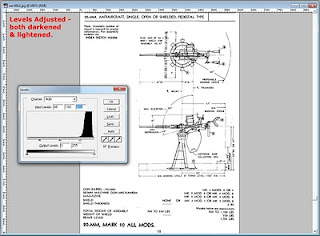
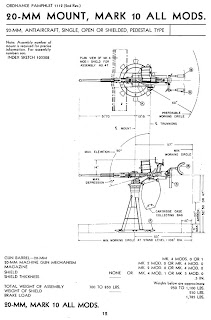
So, now I invite you to compare the results below with the original, both on screen and with a print out.
This is also a technique I've found that can be used to increase OCR accuracy when converting document scans to HTML. It essentially filters out most of the noise that can confuse OCR programs but I only use it in selected sheets as it does add a minute or two to each page.
The below images show the technique I came up with farting around on my own; I don't profess to be a master, and I'm using a ten year-old version of Adobe Photoshop, so your screen may look a little different if you're trying this for the first time on a newer version, but the principles are the same.
In photoshop, go to "image" --> "Adjust" and choose "levels." You'll wind up with something that looks like the below image:

Now, take the black point slider on the left and move it towards the center, to make the darks darker, and then the white point slider on the right and move it to the center, to make the whites whiter. You are essentially adjusting the contrast of the image. Each image will have a different histogram, so there is no set value in the input level boxes up top that you can memorize and set. What I've found works best for me is to move the white point slider either to the center of the hump on the right of the histogram, or a bit beyond it towards center; this will take out a lot of the background noise, but also fades the black text and lines out a bit. So we then compensate by taking the black point slider in to where there is a a little bit of histogram showing, which will darken our lines back up. Such as you see below:

So, now I invite you to compare the results below with the original, both on screen and with a print out.

This is also a technique I've found that can be used to increase OCR accuracy when converting document scans to HTML. It essentially filters out most of the noise that can confuse OCR programs but I only use it in selected sheets as it does add a minute or two to each page.
Saturday, May 15, 2010
The Process
I'm somewhat unique in what I do... while sites like Hyperwar and the Historic Naval Ships Association post documents from archives. I spend more time on formatting with HTML; the downside is slower "production" but I believe it makes some of the documents easier to read and "get" where one page transitions to another. All-in-all, I think we have a good ecosystem of postings with good variety and flavor. In fact, I've made arrangements that if I get hit by a bus or something similar, the documents I've posted will wind up on Hyperwar in some form, so there should be good coverage over the years.
I thought I'd write a bit about how I post a document. I could simply post jpgs or convert to PDF, but the disadvantage is that the text isn't indexable and for people with slower connections, it can take an awful long time to load 10 pages of large jpgs.
So I still hand-write my pages with the thought of trimming as much as possible out of the code to keep it fast-loading while at the same time preserving the formatting of the original. I've been aided in the last five years by the progression of OCR software, and the picture below shows a little bit of my workflow:

Left screen has the OCR program and the right screen is Homesite, my web page software of choice for a scarily long time now. I started with notepad back in 1995, and at some point soon after switched to a freeware program called DerekWare, which had buttons for dropping in pieces of code, and was a little more friendly for web design. It had one limitation I discovered after a bit, in that it couldn't handle pages larger than 21k, which was fine for a bit, but today some of my documents would blow it out of the water (the USS San Francisco Guadalcanal Damage Report is just about 100k in text and code alone, and the 1941 US Navy Fleet listing is over 125k). I purchased Homesite before the millennium and upgraded to version 5 maybe a year or two after... it's worked fine in Vista and Windows 7 so I'll probably be using it for another five years at least.
The current OCR program is Abbyy Fine Reader, which came bundled with my microtek scanner. It's a definite improvement over the OmniPage software I started with, but it's also newer... albeit itself it's at least two years old now. It does fairly well as long as the scans weren't of onionskin copies that were a couple of generations away from the original... in that cases it's faster to re-type things from scratch, and for the most part I tend to avoid those projects now. There are a couple of quirks; it consistently reads "ltr." as "Itr," and sometimes "planes" as "pianos," which can lead to some fun mental images when you read about pianos strafing or dropping depth charges. Because some of these are subtle differences in characters, I always do two passes of proofreading; one in Homesite's code view for the obvious stuff, and then another in the actual web browser to find things that are subtle, such as Os when I need 0s. Below is an example of what I consider an OK OCR pass:
Each paragraph takes maybe a minute or two to proofread and format. Document headers and things with more formatting-per-text take longer, of course.
I test the documents in IE8, Firefox, SeaMonkey (a firefox derivative that's my browser and e-mail client of choice) and recently Chrome. There are some differences in how they handle spacing so I don't sweat a space off here and there between the browsers, but what you see is probably 90% of the formatting on the original.
I thought I'd write a bit about how I post a document. I could simply post jpgs or convert to PDF, but the disadvantage is that the text isn't indexable and for people with slower connections, it can take an awful long time to load 10 pages of large jpgs.
So I still hand-write my pages with the thought of trimming as much as possible out of the code to keep it fast-loading while at the same time preserving the formatting of the original. I've been aided in the last five years by the progression of OCR software, and the picture below shows a little bit of my workflow:

Left screen has the OCR program and the right screen is Homesite, my web page software of choice for a scarily long time now. I started with notepad back in 1995, and at some point soon after switched to a freeware program called DerekWare, which had buttons for dropping in pieces of code, and was a little more friendly for web design. It had one limitation I discovered after a bit, in that it couldn't handle pages larger than 21k, which was fine for a bit, but today some of my documents would blow it out of the water (the USS San Francisco Guadalcanal Damage Report is just about 100k in text and code alone, and the 1941 US Navy Fleet listing is over 125k). I purchased Homesite before the millennium and upgraded to version 5 maybe a year or two after... it's worked fine in Vista and Windows 7 so I'll probably be using it for another five years at least.
The current OCR program is Abbyy Fine Reader, which came bundled with my microtek scanner. It's a definite improvement over the OmniPage software I started with, but it's also newer... albeit itself it's at least two years old now. It does fairly well as long as the scans weren't of onionskin copies that were a couple of generations away from the original... in that cases it's faster to re-type things from scratch, and for the most part I tend to avoid those projects now. There are a couple of quirks; it consistently reads "ltr." as "Itr," and sometimes "planes" as "pianos," which can lead to some fun mental images when you read about pianos strafing or dropping depth charges. Because some of these are subtle differences in characters, I always do two passes of proofreading; one in Homesite's code view for the obvious stuff, and then another in the actual web browser to find things that are subtle, such as Os when I need 0s. Below is an example of what I consider an OK OCR pass:
As was suggested in reference (c}^ th® Bureau has mad© an evaluation of the gasoline capacity and steaming radius of the several carriers in service. These data are furnished below and are bfised on information available to the Bureau o« fuel oil and gasoline consumption for the second and third quarters of the fiscal year 1942,
Each paragraph takes maybe a minute or two to proofread and format. Document headers and things with more formatting-per-text take longer, of course.
I test the documents in IE8, Firefox, SeaMonkey (a firefox derivative that's my browser and e-mail client of choice) and recently Chrome. There are some differences in how they handle spacing so I don't sweat a space off here and there between the browsers, but what you see is probably 90% of the formatting on the original.
Thursday, April 29, 2010
Today is history
At least, for a little while I have decided to back-burner the "today in Pacific WWII History" feature on the site. It's been sucking up all of my work time and I'm not getting much work done on new documents, nor have I had the energy to blog. I still plan on working on it and not only finishing it, but expanding it, but for the time being I need to keep this fun and not feeling like a burden.
So... some catch-up. On the first of this month I had the good fortune to visit with Gary Kingzett and Lou Parker. Lou served in WWII on the command staff for a cruiser division; hence he bounced back and forth between the cruisers San Francisco and Wichita. He's a great guy and interesting as hell to talk to.
The Seattle IPMS club held its annual Spring Show a couple of weeks ago, at which I gave a presentation on the Aircraft at Pearl Harbor.
I have managed to get in a little document work here and there.. I've finished an interview with two of the pilots who were on the mission to shoot down Admiral Yamamoto done shortly after they returned to the states. I have another one regarding the photo-reconnaissance in place in the med during operations there, and it is quite interesting to read how much they were tasked with doing and how broad of a program it was.
I also picked up a 1/350th model of USS Nimitz CVN-68 that I'll be doing as USS Theodore Roosevelt CVN-71 during the First Gulf War. That... will be quite the project.
So... some catch-up. On the first of this month I had the good fortune to visit with Gary Kingzett and Lou Parker. Lou served in WWII on the command staff for a cruiser division; hence he bounced back and forth between the cruisers San Francisco and Wichita. He's a great guy and interesting as hell to talk to.
The Seattle IPMS club held its annual Spring Show a couple of weeks ago, at which I gave a presentation on the Aircraft at Pearl Harbor.
I have managed to get in a little document work here and there.. I've finished an interview with two of the pilots who were on the mission to shoot down Admiral Yamamoto done shortly after they returned to the states. I have another one regarding the photo-reconnaissance in place in the med during operations there, and it is quite interesting to read how much they were tasked with doing and how broad of a program it was.
I also picked up a 1/350th model of USS Nimitz CVN-68 that I'll be doing as USS Theodore Roosevelt CVN-71 during the First Gulf War. That... will be quite the project.
Saturday, March 20, 2010
Happy Spring!
Some house cleaning items.
I came across some aviation stuff the last two trips and am working on posting it ahead of some other items for a couple of reasons. I like aviation, I want to broaden the site from being so ship specific, and frankly the amount of digital stitching to get some of the drawings for the 1.1" manual has got me dreading the project.
The "Today in History" project continues to swallow a lot of time as well. My goal has been to have at least two items per day, and that can take some time. Each entry takes about 20-30 minutes minimum to find, research, and expand upon. It's been a fun learning process, but it also slows down the new document posting, for something that doesn't add "much" to the site.
Also adding to the slowdown is an impending move; months away, but packing needs to start now.
I came across some aviation stuff the last two trips and am working on posting it ahead of some other items for a couple of reasons. I like aviation, I want to broaden the site from being so ship specific, and frankly the amount of digital stitching to get some of the drawings for the 1.1" manual has got me dreading the project.
The "Today in History" project continues to swallow a lot of time as well. My goal has been to have at least two items per day, and that can take some time. Each entry takes about 20-30 minutes minimum to find, research, and expand upon. It's been a fun learning process, but it also slows down the new document posting, for something that doesn't add "much" to the site.
Also adding to the slowdown is an impending move; months away, but packing needs to start now.
Subscribe to:
Posts (Atom)